

Why would anyone in their right mind use hexagons for keys on an ergonomic keyboard, or any keyboard for that matter. Allow me to persuade you that there are in fact some compelling geometrical reasons that make hexagons a perfect choice.
Geometry of Hexagonal Keys
1 Packing Circles
A hexagonal grid emerges naturally when packing circles as tightly as possible. Conversely, a hexagonal grid maximizes the size of non-overlapping circles centred at each key. That means, it maximizes the size of the target for each key and with that, the chances of pressing the correct key even when hitting it slightly off-centre. To put this into concrete numbers, circles in a square grid cover about 78.5% of the total area (𝛑 / 4). Circles in a hexagonal grid cover about 90.7% of the total area. This translates to a 15.5% larger target area per key that still results in a correct key stroke.
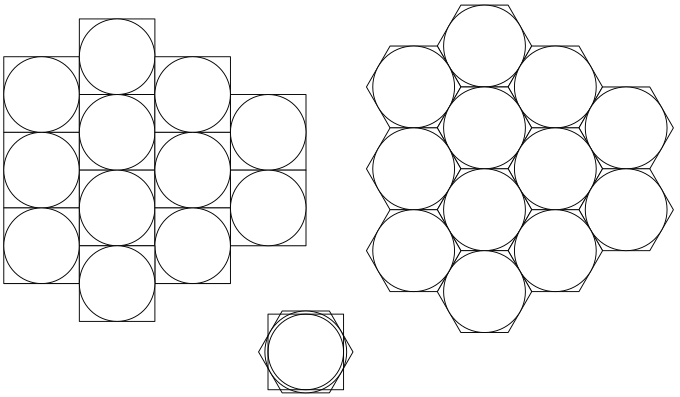
The squares and hexagons in this example have the same area. But hexagons present a larger circular target area. A larger target means a better chance of hitting the right key
2 Equidistant Neighbours
Each hexagon in a grid has six neighbours that are all the same distance away. Compare that with a square grid where each key has eight neighbours but the diagonal ones are 1.4× further away than the orthogonal ones. This matters for the index and pinkie fingers that need to reach sideways as well as up and down. The hexagonal grid eliminates those long diagonal stretches from the home position. The price we pay for that convenience is, there is one fewer neighbour to water the plants or feed the cat when the index finger goes on vacation. This requires some modifications to the keymap. More about that below.
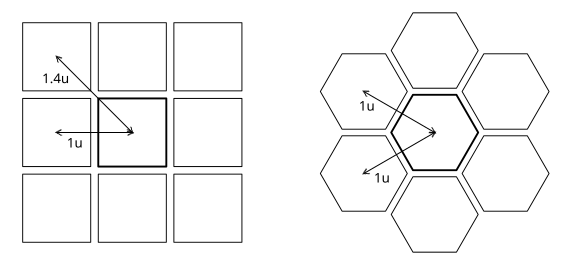
Neighbours of hexagons are all the same distance away
3 Rotation and Stagger
Rows of hexagons in a grid are naturally staggered against each other by half the key width. If the pointy ends point up and down, you get staggered horizontal rows. Rotate the grid or your point of view by 30° so hexagons have pointy ends left and right, and you get staggered vertical columns instead. For an ergonomic keyboard, staggered columns are much preferred. That way fingers can move straight up and down their columns while the stagger accommodates the lengths of different fingers.
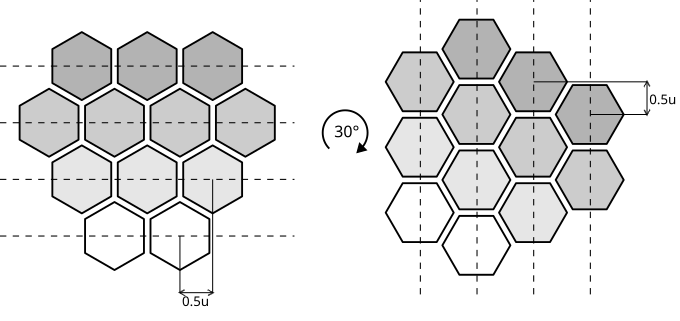
Hexagonal grids have naturally staggered rows. A 30° rotation turns row-stagger into column-stagger
The Mantis layout looks like it has staggered horizontal rows at a first glance. But your forearms do not grow out of the middle of your stomach. Therefore your arms, hands and fingers are naturally angled inwards as they approach the keyboard. If you keep your wrists and shoulders relaxed, your fingers don't move straight up and down as you straighten or curl them. Instead they move at an angle up-and-inward or down-and-outward. Most mono-block ergo keyboards are designed with some degree of inward hand rotation for this reason. At a 30° angle, the hexagonal grid is actually column-staggered. In other words, hexagons give us both a comfortable 30° inward rotation and staggered columns for free.
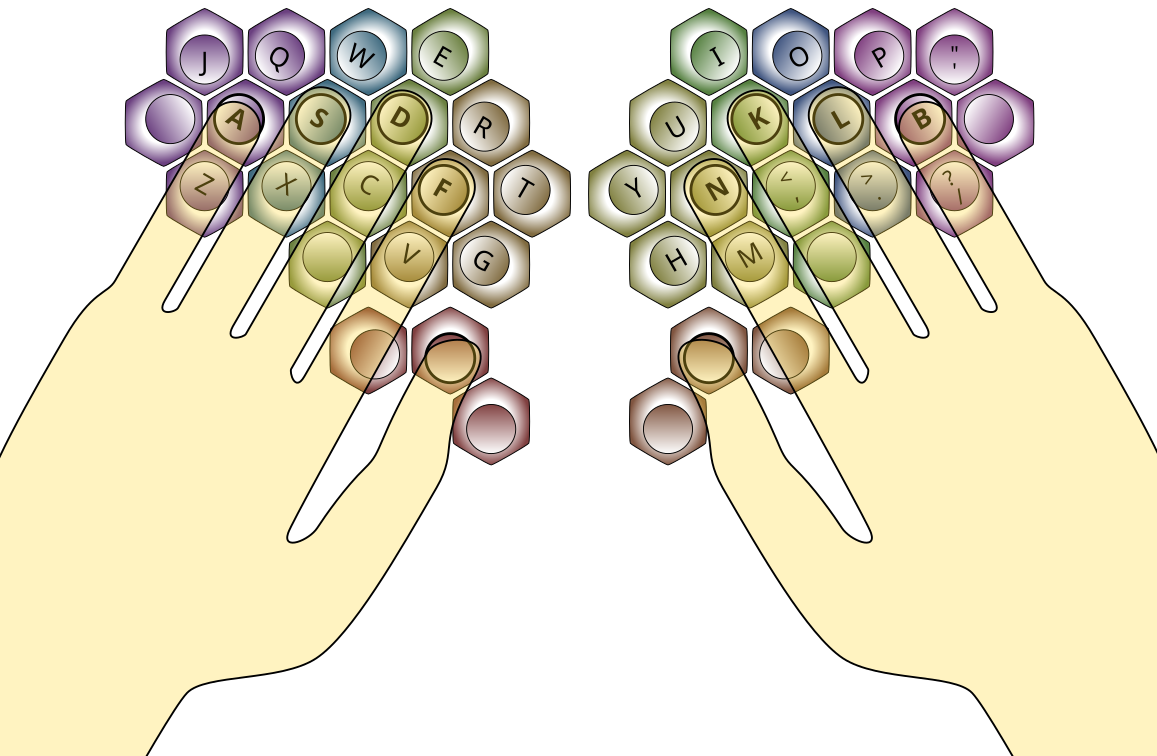
Comfortable hand rotation and column stagger are hidden inside the hexagonal grid. The Mantis layout is optimized to take advantage of those hidden qualities
4 Rotation and Symmetry
Hexagons have one more trick up their sleeve that Mantis uses to its advantage. It's the symmetry that allows them to rotate in 60° steps compared to 90° steps for square keys. The keys on Mantis are not strictly symmetrical as they are sculpted with tilted tops to match the direction of key strokes and to reduce finger motion. The diagram above shows this in the shading of the keys. As hexagons provide more options to rotate them, the same tilted key shape can serve multiple functions. On the home row, the keys are tilted to match the tenting angle that results from the raised centre. On the top and bottom rows the tilt is rotated to blend tenting with an arc along the path of the fingers in their columns. A square key could be rotated to give you either tenting or an arc along the column. A hexagon can do both at the same time. The inner index and outer pinkie columns are rotated to make those keys easier to actuate reaching sideways. The same tilted key shape also works well for thumb keys if rotated appropriately. In theory one could assemble a Mantis keyboard with the same shape for every key. The rotation of the keys alone would result in a decently sculpted profile. But it's even more comfortable and efficient with taller and more strongly tilted keys on the periphery.
QWERTY Layout Modifications
Compared to the main three rows of a normal keyboard, Mantis is missing one key from each index finger. If we were to play a round of musical chairs to choose one letter from each index finger to move to the pinkies, the laziest, least frequently used keys would probably lose. In English that would be 'V' on the left and 'J' on the right.
It's unfortunate that 'J' is also the home key on a standard keyboard; but there is no reasonable justification to let it keep the best seat in the house. It has to move. The letter 'N' is the obvious replacement for 'J'. It is one of the most frequently used letters and on an ortho or column-staggered layout it is usually also among the most distant and hardest-to-reach keys. Putting it on the home position will make typing that much more comfortable.
'V' is commonly used for keyboard shortcuts (e.g. Ctrl-V to paste). Therefore, it is a good idea to keep 'V' at its usual position in the bottom row. On the other hand, 'B' is often problematic for people transitioning to a split layout due to a habit of using it with the wrong hand. Moving this instead of another key minimizes further disruption.
Looking for suitable new placements for 'J' and 'B', we try to avoid frequent same finger bigrams that would be very uncomfortable to type with the pinkies. With that in mind, 'B' works much better on the right pinkie than the left ('BA' or 'AB' are much more common bigrams than 'PB' or 'BP'). If we evict the punctuations ';:' to an outer pinkie key, we have an excellent location on the home row ready for 'B' to move in.
'J' is very rare on its own, so its bigrams are also rare. To keep things balanced 'J' moves to the left pinkie, left of 'Q'. The layout diagram above shows the result of all these shuffles.
Conclusion
To sum it up in a few sentences, hexagons are an excellent choice for keys on an ergonomic mono-block keyboard. Their shape naturally produces hand rotation and column stagger, reduces finger movements during lateral stretches and maximizes the target area of each key. The ability to rotate keys in 60° increments helps create an intricately sculpted key profile with a minimal number of unique keycap shapes.
The only drawback is the loss of one key per index finger. The keymap changes needed to mitigate that loss can further improve typing comfort. They move 'N' and 'B' to more comfortable positions on the home row, while moving less frequently used 'J' and a punctuation key to the outer pinkie columns.
Side effects may include perplexed sideways glances and conversations about ergonomic keyboards with complete strangers.
